> ## Documentation Index
> Fetch the complete documentation index at: https://landinglens.docs.landing.ai/llms.txt
> Use this file to discover all available pages before exploring further.
# Plans
export const vp = 'Visual Prompting';
export const smartLabel = 'Smart Labeling';
export const productLL = 'LandingLens';
export const mi = 'Mobile Inference';
export const llsf = 'LandingLens on Snowflake';
export const companyName = 'LandingAI';
*This article applies to these versions of LandingLens:*
| LandingLens |
LandingLens on Snowflake |
| ✓ |
✖ |
## Get LandingLens
Sign up for LandingLens for free [here](https://app.landing.ai/signup)!
We recommend using LandingLens in a Chrome browser.
## LandingLens Plans
{companyName} offers these plans to meet your computer vision needs: **Free** and **Enterprise**. Get detailed information on our [Pricing](https://landing.ai/pricing/) page.
| Feature | Free | Enterprise |
| --------------------------------------- | ------------------------------------ | ------------------------------------------------------------- |
| **General** | | |
| Cost | \$0 | Contact [sales](https://landing.ai/contact-sales) for pricing |
| Credits | 1,000 per month | Custom |
| Credit Overages | Not supported | Custom |
| Create Organizations | Unlimited | Unlimited
|
| Invite Users
| 3 | Custom |
| Create Projects | Unlimited
| Unlimited
|
| Role/Access Control | ✓
| ✓
|
| **Data Management** | | |
| Unlimited Projects | ✓
| ✓
|
| Unlimited Classes | ✓
| ✓
|
| Up to 10k images per project
| ✓
| ✓
|
| Image Annotation
| ✓
| ✓
|
| Import Labeled Images
| ✓
| ✓
|
| Agreement-Based Labeling
| ✓
| ✓
|
| Meta Data Management/Tags
| ✓
| ✓
|
| **Model Training** | | |
| Model Training
| ✓
| ✓
|
| Snapshot (Versioning)
| Unlimited | Unlimited
|
| Visual Prompting
| ✓
| ✓
|
| Advanced Training
| ✓
| ✓
|
| **Model Deployment** | | |
| LandingEdge
| ✓
| ✓
|
| Docker App
| ✓
| ✓
|
| Unlimited Cloud Model Deployments
| ✓
| ✓
|
| Active Project/Download Model
| 1 Download - Noncommercial Use
| Starting at 5
|
| **Security & Access** | | |
| Private Projects
| ✓
| ✓
|
| SAML SSO
| -
| ✓
|
| **Support** | | |
| Community Support
| ✓
| ✓
|
| In-Product Support
| ✓
| ✓
|
| Customer Success
| -
| ✓
|
## Sign Up for a LandingLens Plan
Sign up for LandingLens [here](https://app.landing.ai/signup)!
All plans start as the Free plan. You can [upgrade](./plans#upgrade-to-the-enterprise-plan) your plan at any time.
## Credits
Credits are a form of currency on the LandingLens platform. You spend credits when you perform these actions:
* **Train models**: “Teach” models what they should detect.
* **Run inference**: Have the model detect what it was "taught" to look for in new images.
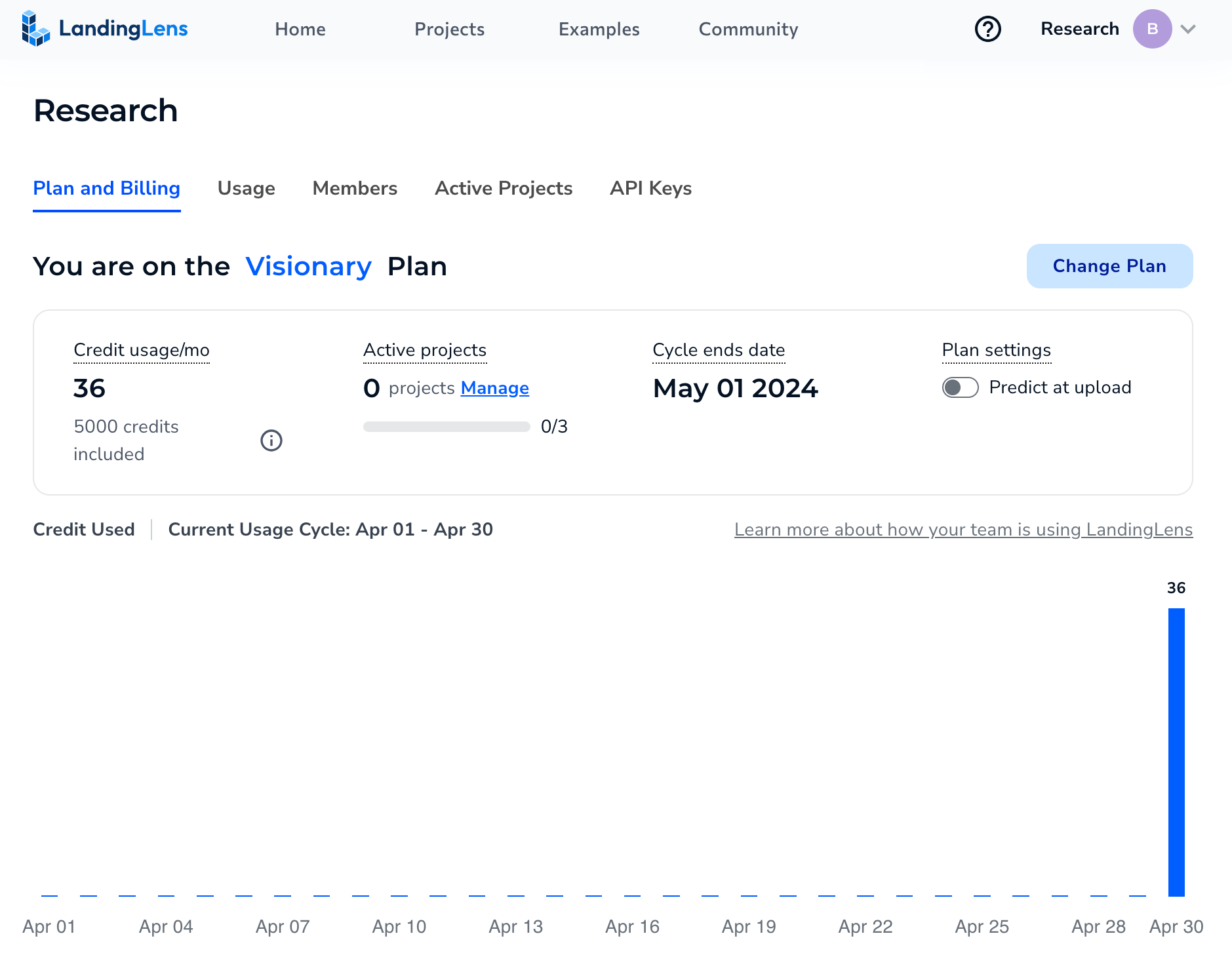
Anyone in your organization can use the credits. You can find more information about your organization's credit balance and usage on the **Plan and Billing** and **Usage** pages.
 ### What can I spend my credits on?
Credits are used for training models or making predictions. The number of credits used depends on whether you're using [Fast Training](./train-models) (the default training method) or [Custom Training](./custom-training):
| | Fast Training Cost | Custom Training Cost |
| --------------------------- | ------------------ | --------------------------------------------- |
| Include 1 image in training | 1 credit | Depends on project type and training settings |
| Run inference on 1 image | 1 credit | Depends on project type and training settings |
For detailed information about how credits are calculated for Custom Training, go [here](./custom-training).
### Credit Usage Example
Here's an example of how you can "spend" 5,000 credits:
| Action | Credits Used | Credits Left |
| ------------------------------------------------------------------------------------------------------------------------------------------------------------------------------------------ | ------------ | ------------ |
| Use Fast Training to train a model with 200 images. | 200 | 4,800 |
| You want to improve model performance so you update labels. Then you run Fast Training with the 200 images again. | 200 | 4,600 |
| You run inference on 10 images to see how the model performs on images it hasn't seen before. Since the model was created using Fast Training, each inference (prediction) costs 1 credit. | 10 | 4,590 |
| Based on how the model performed on the new images, you update the labels. Then you run Fast Training with the 200 images again. | 200 | 4,390 |
| You run inference on 10 images again to test the model. | 10 | 4,380 |
| You are happy with the model performance. You can now deploy the model to a production environment and use the rest of the credits to run inference. | 4380 | 0 |
### Can I go over my allotted credits?
If you're on the **Free** plan, your organization is allotted 1,000 credits per billing cycle. More credits cannot be added.
If you're on the **Enterprise** plan, contact your account team or [support@landing.ai](mailto:support@landing.ai) for information about how credits are managed.
### Do credits roll over at the end of the billing cycle?
For Free plans, credits do not roll over. Your allotted credits reset each month.
If you're on the **Enterprise** plan, contact your account team or [support@landing.ai](mailto:support@landing.ai) for information about how credits are managed.
### Who can use credits?
All credits are placed into your organization's "bank". Anyone in your LandingLens organization can use those credits.
### If I spent credits on a project and delete that project, will those credits be refunded?
No. Any credits that have been spent cannot be refunded.
### Predict at Upload
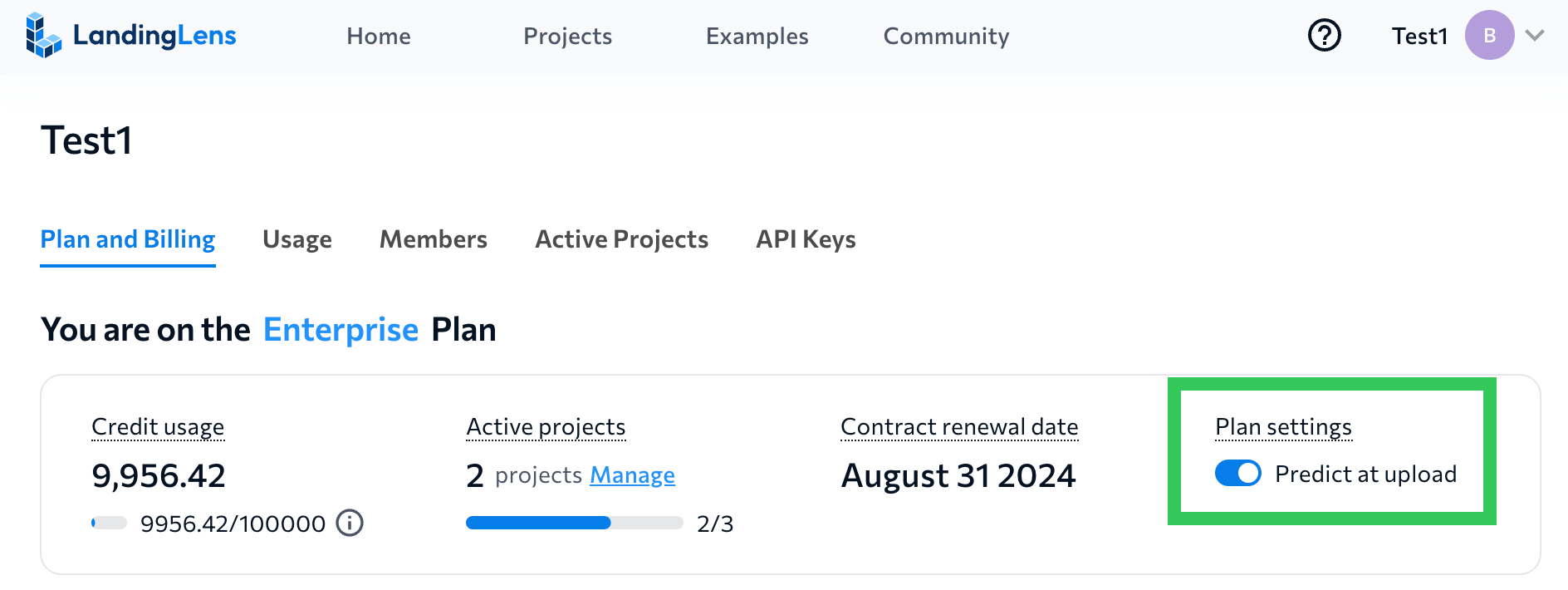
The **Predict at Upload** setting impacts credit usage. If **Predict at Upload** is enabled and you upload a new image to a project that already has a trained model, the model runs inference on that image. Running inference on an image consumes credits. By default, the **Predict at Upload** setting is disabled.
To enable or disable the **Predict at Upload** setting, go to the **Plan and Billing** page.
### What can I spend my credits on?
Credits are used for training models or making predictions. The number of credits used depends on whether you're using [Fast Training](./train-models) (the default training method) or [Custom Training](./custom-training):
| | Fast Training Cost | Custom Training Cost |
| --------------------------- | ------------------ | --------------------------------------------- |
| Include 1 image in training | 1 credit | Depends on project type and training settings |
| Run inference on 1 image | 1 credit | Depends on project type and training settings |
For detailed information about how credits are calculated for Custom Training, go [here](./custom-training).
### Credit Usage Example
Here's an example of how you can "spend" 5,000 credits:
| Action | Credits Used | Credits Left |
| ------------------------------------------------------------------------------------------------------------------------------------------------------------------------------------------ | ------------ | ------------ |
| Use Fast Training to train a model with 200 images. | 200 | 4,800 |
| You want to improve model performance so you update labels. Then you run Fast Training with the 200 images again. | 200 | 4,600 |
| You run inference on 10 images to see how the model performs on images it hasn't seen before. Since the model was created using Fast Training, each inference (prediction) costs 1 credit. | 10 | 4,590 |
| Based on how the model performed on the new images, you update the labels. Then you run Fast Training with the 200 images again. | 200 | 4,390 |
| You run inference on 10 images again to test the model. | 10 | 4,380 |
| You are happy with the model performance. You can now deploy the model to a production environment and use the rest of the credits to run inference. | 4380 | 0 |
### Can I go over my allotted credits?
If you're on the **Free** plan, your organization is allotted 1,000 credits per billing cycle. More credits cannot be added.
If you're on the **Enterprise** plan, contact your account team or [support@landing.ai](mailto:support@landing.ai) for information about how credits are managed.
### Do credits roll over at the end of the billing cycle?
For Free plans, credits do not roll over. Your allotted credits reset each month.
If you're on the **Enterprise** plan, contact your account team or [support@landing.ai](mailto:support@landing.ai) for information about how credits are managed.
### Who can use credits?
All credits are placed into your organization's "bank". Anyone in your LandingLens organization can use those credits.
### If I spent credits on a project and delete that project, will those credits be refunded?
No. Any credits that have been spent cannot be refunded.
### Predict at Upload
The **Predict at Upload** setting impacts credit usage. If **Predict at Upload** is enabled and you upload a new image to a project that already has a trained model, the model runs inference on that image. Running inference on an image consumes credits. By default, the **Predict at Upload** setting is disabled.
To enable or disable the **Predict at Upload** setting, go to the **Plan and Billing** page.
 ## Upgrade to the Enterprise Plan
If you'd like to upgrade to the Enterprise plan, or you're not sure which features you need for your use case, contact our [Sales team](mailto:sales@landing.ai).
## Downgrade or Cancel Your Plan
If you want to downgrade or cancel an Enterprise plan, contact our [Sales team](mailto:sales@landing.ai).
## Upgrade to the Enterprise Plan
If you'd like to upgrade to the Enterprise plan, or you're not sure which features you need for your use case, contact our [Sales team](mailto:sales@landing.ai).
## Downgrade or Cancel Your Plan
If you want to downgrade or cancel an Enterprise plan, contact our [Sales team](mailto:sales@landing.ai).